Expense Report Generator
An internal tool that turns line items and photographed receipts into a finished expense PDF, entirely in the browser, so receipts never leave the employee's device and there is no backend to run.
Context
Filing an expense report meant assembling a spreadsheet, photographing receipts, and mailing accounts payable a pile of attachments that arrived in whatever order the mail client chose. The output was inconsistent enough that the finance side spent real time reassembling it.
The obvious build is a small web app with a database and a file store. I built something narrower.
Approach
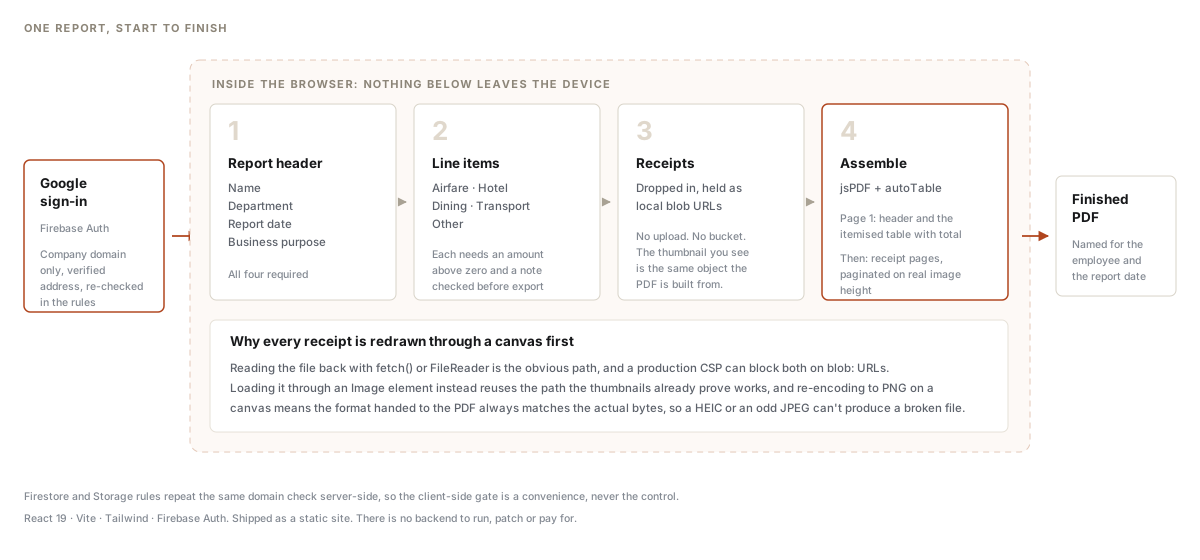
No backend. The whole report is assembled client-side: the form, the running total, the PDF. Receipts are held as local object URLs and drawn straight into the document. Nothing is uploaded, so there’s no storage bucket full of other people’s meal receipts, no retention question, and nothing to run or patch. It deploys as a static site.
Validation before export, not after submission. Required fields, an amount above zero on every item, and a description on every item, all checked before a PDF exists. The failure mode of the old process was a report that reached finance and bounced. The failure mode here is a button that tells you what’s missing.
A fixed output shape. Page one is the header and the itemised table with a
total. Then receipt pages, paginated on the real height of each image rather
than a guess, each labelled with its filename. Finance gets the same document
every time, and the file arrives named for the employee and the report date
instead of Scan_0043.pdf.
The bug that was worth avoiding. Reading an uploaded receipt back into the
document is the obvious one-liner, and both obvious approaches, fetch() and
FileReader, can be blocked by a production content security policy on blob:
URLs. Loading the image through an Image element instead reuses the path the
on-screen thumbnails already prove works, and re-encoding it through a canvas
guarantees the image format declared to the PDF matches the actual bytes. An
odd JPEG or a phone’s HEIC can’t silently produce a corrupt file. A receipt
that still fails is labelled in the PDF rather than dropped from it.
The sign-in is not the control. Access is a company Google account, and the same domain check is repeated in the Firestore and Storage rules server-side. The client-side gate is a convenience. The rules are the boundary.
Outcome
- Employees produce a consistent, finance-ready PDF in one pass, with receipts attached in order and the total already computed.
- No server, no database of receipts, and no ongoing operational cost.
Artifacts